

About – FAQ
On this page you will find the most frequently asked questions about researching with FID Media Search as well as those concering publishing in the FID Media Publish's repository.
Frequently asked questions and their answers
The FID Media is the centralised portal for specialised information as well as open access publishing in the field of communication and media studies. Through its specialist discovery platform, FID Media Search, and its open access publishing services, FID Media Publish, FID Media brings together two core services at the interface between scholarly libraries and disciplinary research. In addition, FID Media Community provides news and updates from the disciplines and promotes connections between researchers and research infrastructures.
The catalogue within FID Media Search serves as the central discovery and access portal for anyone interested in, studying, teaching, researching, or working in the fields of communication, film, television, and media. It provides swift and effective access to academic literature and other relevant information resources.
FID Media Publish brings together all services relating to open access publishing. These include the disciplinary repository, advisory services on copyright and open science, a pledging service for consortially funded open access, and the digitisation of subject-relevant collections.
FID Media Community collects announcements of current and past events as well as calls for papers from across the disciplines, with the long-term aim of creating an archive of scholarly events that serves as a record of the field’s academic culture.
We are continuously working to further expand our services concerning open access publishing, specialised information, and research data. We are being financed through resources provided by the University Libraries of Leipzig and Marburg, the Institute of Media Studies at the Philipps-Universität Marburg, along with grants from the German Research Foundation (DFG) as part of their ‘Fachinformationsdienste für die Wissenschaft’ [Discipline-Specific Information Services] programme.
We regularly update our blog on our front page which will inform you of any news concerning the FID Media. If you already have an FID Media account, you can easily sign up for our newsletter which will keep you informed about everything new concerning the FID Media. The option to sign up can be found in the personal data section of your account.
Also consider following us on Bluesky, Mastodon or LinkedIn for all new information and developments regarding open science and publishing in communication and media studies, along with notifications about various events concerning those fields.
In accordance with the DFG funding guidelines, FID Media is primarily intended for researchers in communication and media studies and related disciplines in Germany, providing rapid and direct access to specialised literature as well as research-relevant information and services, irrespective of their location.
We have summarised our terms of use below:
- Basic searches can be carried out without logging in or registering.
- To make use of all services available through FID Media Search, prior registration for an account is required. Registration is free of charge.
- All information provided when creating an account must be complete and accurate. Accounts containing incomplete information or clearly fraudulent details will be deleted immediately.
- FID Media Search and any documents obtained through FID Media Search may only be used for the user’s own research and scholarly purposes. Users must not share their login credentials or any requested documents, books, or data obtained from databases with third parties.
- Printed books supplied on a user’s behalf are provided on loan and must be returned within the loan period and in good condition, allowing only for normal wear and tear.
The full Terms of Use and Privacy Policy, as amended from time to time, are available on our website.
The FID Media team is available to answer your questions and receive your suggestions. Please contact us via our contact form or by email at info [at] fid-media [dot] de.
FID Media Search: Discovering and Accessing Resources
Why do I need an account? How do I search in FID Media Search? How can I access literature?
These questions are answered in the following video tutorial:
The FID Media catalogue is a subject-specific discovery system designed for research in communication and media studies and related disciplines. It complements the holdings of local libraries by providing access to a broad range of relevant resources.
By default, a search is performed across all available sources and results are ranked automatically according to relevance. Unlike a traditional library catalogue or federated search, FID Media Search can also search enriched catalogue data, such as abstracts and tables of contents. Searches can, of course, be refined at any time using specific criteria, for example by author, year of publication, or resource type.

Using the categories “All”, “Texts”, “AV Media”, and “New Releases”, searches can be limited specifically to text-based resources, audiovisual materials, or newly published print publications. The category filter is located above the search box on the homepage and, elsewhere in the portal, to the left of the search box.
An “Advanced Search” is also available, allowing users to search specifically for particular fields such as author or title. The Advanced Search can be accessed at any time via the menu in the top right-hand corner.
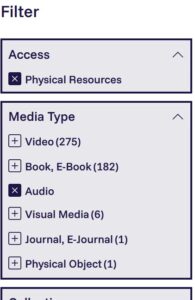
Search results can be refined further using the facets displayed alongside the results list. For example, results can be restricted to online resources, videos, or publications from specific years. All facets can be selected and deselected individually and may be combined freely to create highly targeted searches.
Search results with identical titles, names, and publication years are displayed in grouped form. Parallel editions published in different formats, such as print and e-book versions, are likewise consolidated into a single record. By clicking “Show grouped items”, all related entries can be displayed.
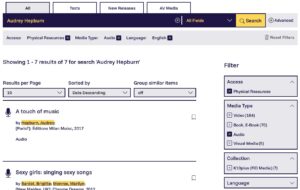
Depending on the search query, the FID Media catalogue may return different types of results, including:
- Open access and other freely available documents
- Print holdings
- E-books
- Journal articles
- New publications from publishers
- Audiovisual media
The icons indicate the resource type of each item, such as a book, audio recording, video, or article.
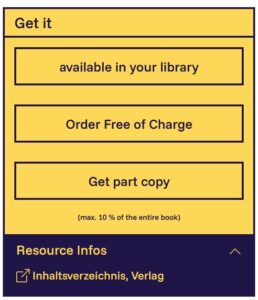
By clicking on a title in the results list, detailed information about the resource can be viewed. The “Get It”-Box indicates the available access options and how the resource can be obtained.
Open access resources are clearly identified and include a direct access link. For resources that are not openly accessible, various options for obtaining the requested material are displayed, depending on the title. To make use of these services, registration for an FID Media account is required.
Further information is available in this FAQ under the section “FID Media Search: Discovering and Accessing Resources”.
We continuously integrate new data sources into FID Media Search and thereby expand the catalogue. Nevertheless, it is possible that certain journals or books are not listed in FID Media. This may be due to a variety of reasons, for example:
- A book has not yet been published or has not yet been reported as available.
- A book has been assigned to an incorrect subject category by the publisher and is therefore not captured by our search profile.
- A book has been published by a predatory publisher. Publications from such publishers are generally not included by libraries.
- A publisher does not make its metadata (e.g. for their journals) available for indexing and discovery.
- An article has only recently been published and the publisher has not yet provided the metadata.
- A journal is new or not yet widely known and has not yet been included in FID Media’s article index.
If you cannot find a particular book or journal in the FID Media catalogue, please let us know via the contact form. We are happy to follow up on your suggestions and feedback, helping to improve the service for the entire communication and media studies community.
To make search results easier to navigate, records with identitcal titles, authors, and publication years are grouped together by default and displayed as a single entry. One record is shown as the primary entry in the results list, while additional records can be expanded by clicking “Show grouped items”.
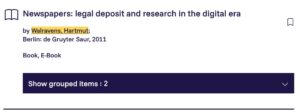
Resources are grouped regardless of format. For example, different editions of a printed book may be grouped together, as may parallel versions of a print book, an e-book, or an open access edition. Records are also grouped when resources such as journal articles or secondary publications are available in multiple repositories.
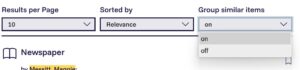
If you prefer not to use grouped results, you can disable this feature by clicking “Group similar items”, located above the facets panel on the right-hand side of the search interface. When grouping is disabled, parallel records will be displayed separately in the search results.
Facets allow you to refine your search results at any time according to specific criteria, such as a particular person, subject area, publication year, or resource type. Simply select the facets you wish to apply. Multiple facets can be combined and removed individually or all at once to further refine your search.
The facets you select are automatically applied to subsequent searches. The active factes are displayed below the search bar. If you wish to start a new, all-encompassing search, click “Reset filters”.

In the category tab located over the search box, you will find the category filters “All”, “Texts”, “Audiovisual Media”, and “New Publications”. These tabs allow you to limit your search specifically to text-based resources, audiovisual media, or newly published titles.
When a category filter is active, this will be displayed above the facets on the right-hand side of the results page.
You can then use the facets to further refine your results, for example by access type, resource type (such as books or journals), or publication year. Multiple facet options can be selected simultaneously.
The facets you select are automatically applied to subsequent searches. The active factes are displayed below the search bar. If you wish to start a new, all-encompassing search, click “Reset filters”.
Open access resources are always marked with the label “Open Access” in the search results, allowing you to quickly identify freely available documents. In the detailed record view, these entries include a link that will take you directly to the document.
If additional digital content is available for a record, such as a table of contents, an abstract, or a sample chapter, a corresponding link will also be displayed.
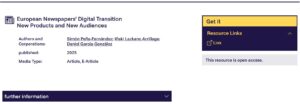
FID Media Search allows you to discover journal articles relevant to your search query that are indexed in our article database. These articles are generally available online. If you are logged in, we will indicate whether a journal article is licensed by your home library or whether the journal is available in print at your library.
If an article is licensed by your institution, simply click on the corresponding link or DOI to access it. In most cases, access requires you to be connected to your institution’s network, for example from a computer in your library, from your office workstation, or remotely via VPN.
If a journal is not licensed by your library, you can request the article using the order button provided by FID Media. The costs of this service are covered by FID Media. In most cases, you will receive the article as a PDF by email within three working days. In exceptional cases, the article may be sent to you as a printed copy by post, for example where licensing restrictions do not permit electronic delivery.
Please note that, in individual cases, links may be incorrect or no longer functional, for example if a publisher has supplied inaccurate linking information. Unfortunately, we have no control over the link data provided by publishers. In most cases, however, the DOI link should lead directly to the article. You can also use the DOI for citation purposes, as it provides a unique and persistent identifier for a journal article.
The FID Media catalogue indexes a wide range of subject-specific books from various library collections. If you are logged in, the catalogue will automatically indicate for most titles whether they are available at your home library or not. This makes it easier to access the literature you need. The different options are explained below:
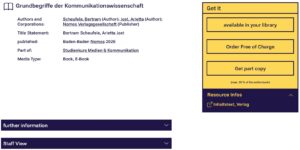
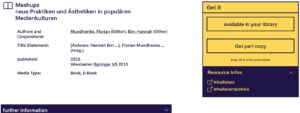
The “Available at your library” button is displayed when the requested book is held by your library. In many cases, we can also display the book’s shelfmark. Please note that this information only indicates whether the book is part of the library’s collection and does not show whether it is currently on loan. By clicking the button, you can access your library’s union catalogue to obtain further information. In most cases, this will also provide a direct link to your library’s local catalogue.
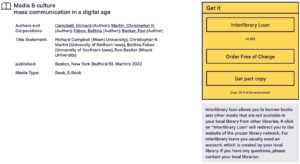
FID Media also allows you to request copies of parts of a book, for example if you only require a particular chapter or a limited number of pages.
For users in Austria and Switzerland, the availability display is not currently available. Instead, an additional link is provided which allows a search to be carried out in the relevant regional library network.
If a book is not available at your library, there are several ways to obtain the literature you need:
1. Request a partial copy
In many cases, you may only need a small section of a book. Rather than requesting the entire book through interlibrary loan, you can request a partial copy through FID Media.
All you need is an FID Media account. For printed works, simply click the “Request partial copy” button and specify the required page numbers in the request form. We will obtain the requested pages for you as quickly as possible, with the costs covered by FID Media. In most cases, you will receive the copy by email within three working days.
For many printed holdings, the table of contents can be viewed directly through the FID Media catalogue, allowing you to identify the pages you require.
Please note that, for copyright reasons, copies are limited to small portions of a work (up to ten per cent) and may only be used for your own academic research.
2. Order a copy
Recently published titles or books that are not yet held by Leipzig University Library can alternatively be requested as printed loan copies free of charge. The book will be sent directly to the delivery address stored in your account. We always aim to provide rapid delivery. However, if a title is not in stock and must first be obtained from the publisher or from abroad, delivery may take longer. Even in such cases, delivery is usually faster than a standard interlibrary loan request, as the book is sent directly to you rather than first being processed by a library and then supplied through the interlibrary loan system.
You may keep the book for 30 calendar days from the date of delivery. After this period, the book must be returned to us at your own expense. Detailed instructions will be provided when the request is placed and when the book is delivered. Unfortunately, loan periods cannot be extended.
3. Request the item through interlibrary loan
If you require more than a small portion of a book, the item can in some cases be requested directly from the FID Media portal via interlibrary loan. In such cases, you will be redirected to the relevant interlibrary loan portal.
If FID Media does not offer a request option for a particular title, you may be able to obtain it through the interlibrary loan service provided by your local library.
As interlibrary loan procedures differ between library networks, we are currently unable to offer a single request form through FID Media. However, you can copy the bibliographic information provided in our catalogue and use it when placing your interlibrary loan request.
*In some cases, your IP address may not be recognised correctly. If this occurs, you will still be shown a selection of libraries, although these may not correspond to your actual location. Library availability information is only displayed if the requested item has an ISBN and the relevant libraries participate in WordCat.
When searching the FID Media catalogue, newly published print books are automatically included in the search results. These titles can be identified by the “New Publication” label displayed in the results list.
Alternatively, you can search specifically for newly published works by selecting the “New Publications” tab before starting your search.
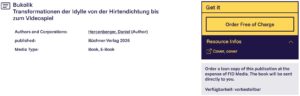
These titles can be requested free of charge for loan. The book will be sent directly to the delivery address stored in your account. We always aim to provide rapid delivery. However, if a title is not in stock and must first be obtained from the publisher or from abroad, delivery may take longer. Even in such cases, delivery is usually faster than a standard interlibrary loan request, as the book is sent directly to you rather than first being processed by a library and then supplied through the interlibrary loan system.
You may keep the book for 30 calendar days from the date of delivery. After this period, the book must be returned to us at your own expense. Detailed instructions will be provided when the request is placed and when the book is delivered. Unfortunately, loan periods cannot be extended.
You can also find a direct link on the FID Media homepage and in your account which allows you to view newly published titles from the previous 30 days with a single click.
The FID Media catalogue includes two different types of e-books:
1. E-books licensed by FID Media
Through specialised publisher collections from Nomos, utb, and Cambridge University Press, as well as through the e-book provider EBSCO, FID Media has licensed a subject-specific collection of around 15,000 e-books in communication, media, and film studies. These titles can be identified in the results list by the label “E-books for FID Media”.
Simply click on the link to the full text and you will be redirected to the external e-book platform. In principle, you can always browse the e-book free of charge for 10 minutes.
In some cases, only the purchase of an e-book may be available, or a loan request may require confirmation by FID Media. If this applies, a notification will be displayed on the platform. In such cases, please use the same email address that is associated with your FID Media account. We will then review your request as quickly as possible.
Any costs incurred will be covered by FID Media.
Please note that, depending on the terms of the licence agreement, you may not be able to download or print the entire e-book. Any such restrictions will be indicated on the platform. In addition, some publishers unfortunately still do not offer e-book licences to specialised information services. In these cases, however, FID Media may be able to provide access through its document delivery services or by supplying a printed copy.
2. Open access e-books and publisher-licensed e-books
The FID Media catalogue also includes e-books that are freely available as open access publications. These titles can be accessed without any licence restrictions.
Some publishers only permit e-books to be licensed by individual libraries, in a manner comparable to the acquisition of a printed book by a library. These e-books are also partially represented in our catalogue. If you are logged into your account, the system will indicate, just as it does for printed books, whether your library holds a licence for a particular e-book. In such cases, you can usually access the e-book via the link provided by FID Media, provided that you are connected to your institution’s network.
FID Media also provides access to a wide range of videos, films, and television programmes through its catalogue.
Among other resources, you can access the streaming services kanopy and arte campus through FID Media. To do so, log in to your FID Media account, navigate to FID Media Search, select “Databases”, and choose the relevant provider.
Some films are also available online. In addition, you can use the FID Media catalogue to search content from the media libraries of public-service broadcasters (ARD, ZDF, arte, 3sat, SWR, BR, MDR, NDR, WDR, HR, RBB, ORF, and SRF). These videos are generally available for immediate streaming and, in many cases, can also be downloaded in both HD and SD quality.
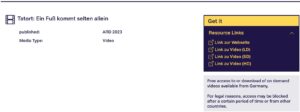
Many videos released on DVD or Blu-ray can be requested through interlibrary loan, although availability and lending policies may vary between libraries. Where applicable, this option will be indicated by a link in the detailed record view.
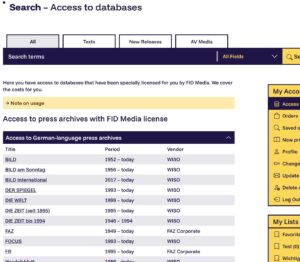
Access to databases is available via the link on the homepage or through the “Database Access” section in your account. FID Media provides access to two types of databases.
1. Databases licensed by FID Media
As a specialised information service, FID Media licenses selected databases in order to provide access for its users. Depending on the user group to which an account is assigned, access to these licensed resources may be restricted or unavailable for legal reasons. Where this is the case, a corresponding notice will be displayed.
2. Subject-specific databases
Users with an account are provided with a personalised list of databases relevant to communication and media studies to which access is available through their home institution, provided they are connected via the institution’s network or through a VPN connection. Clicking on a database displays further information together with a direct access link.
Users without an account are shown only freely accessible databases.
The database information is provided by the Database Information System (DBIS) maintained by Regensburg University Library.
Yes, absolutely. We welcome acquisition suggestions at any time.
If you cannot find a monograph, journal, or journal article in the FID Media Search catalogue, we will do our best to obtain it for you. Simply contact us via our contact form and provide as much information as possible about the resource that is missing from the catalogue.
We will then assess whether the item can be acquired within our scope and will inform you of the outcome.
FID Media Search: Registration and Account
You do not need an account to search the FID Media catalogue. Research can begin immediately without registration.
However, having an account allows you to take advantage of a range of additional services directly within the catalogue.
During your search, you can immediately see whether print publications and audiovisual media are available through your local library and whether you already have licensed access to relevant journals. Licensed journal articles and e-books can be accessed in full text straight away. If a book or journal is not available through your local library, you can request copies or newly published books free of charge through FID Media.
Your account also provides access to a personalised list of subject databases that are available either through your home institution or directly via FID Media.
In addition, an account allows you to save frequently used searches and individual records to your favourites for quick and easy access.
To create an account for FID Media Search, click on the „Register“ link.
You will then be asked to enter your name and email address.
We will send a confirmation email to the address you provided. This step allows us to verify your email address and ensure that you can receive messages from us without any issues. Please click on the link contained in the email and complete all required fields in your personal profile. Once you have done so, your registration is complete.
If you do not receive a confirmation email, please check your spam or junk mail folder. If the email cannot be found there either, please try registering again. Should you still not receive any emails from us, please contact us via the contact form.
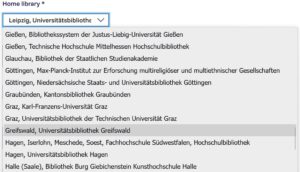
Please select as your home library the library that you primarily use at your place of residence or work and where you ideally already have a library account.
For books and electronically available journal articles, this information allows us to show whether a book is available at your library or whether a journal article can be accessed online immediately because it is licensed by your institution. In most cases, we will provide a direct link to the article or display the article’s DOI (Digital Object Identifier)
We also use this information to show you the subject-specific databases that are directly accessible to you.
If you would like to change your user group, please contact us via the contact form so that we can review and update your account status.
Click on the “Forgot password?” link on the login page and enter the email address associated with your FID Media account. You will then receive an email containing a link that allows you to reset your password.
Click in your account on the button “change password” and follow the instructions.
Click in your account on the button “update e-mail adress” and follow the instructions. Remember to log in next time using the updated e-mail adress.
Please note that if the email address associated with your account is no longer valid, FID Media reserves the right to delete the account after an appropriate period of time.
We take all reasonable measures to protect your personal data against unauthorised access.
Access to the search portal and your account is provided exclusively via an encrypted connection. If you remain inactive after logging in, you will be automatically logged out after no more than 60 minutes.
Your data are stored on a server that is not publicly accessible, and regular backups are performed. In addition, whenever important account changes are made (for example, changes to your password or email address), a notification email is sent to the email address associated with your account.
Your personal data are only shared where this is strictly necessary, for example when you request a printed publication.
Further details can be found in our Privacy Policy.
In your account, click on the “delete account” button and follow the instructions provided. Access to your account will be disabled immediately, and the account will be removed during the next maintenance cycle, provided that there are no outstanding requests, orders, or similar transactions associated with it.
All data stored in your account will be permanently deleted and cannot be restored once the account has been removed.
If we are notified that the email address associated with an account is no longer valid, FID Media reserves the right to delete the account automatically after an appropriate period of time.
FID Media Search: Special features
Yes. In your account, you will find the “Saved Searches” option. There you can review all searches carried out during your current session. Searches can also be saved permanently to your account, for example if you need to run the same search regularly.
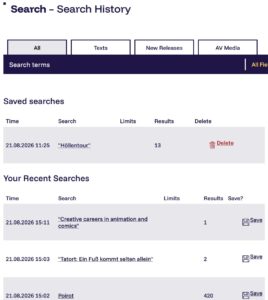
The following functions are available for search results:
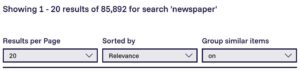
- Results per page Allows you to specify how many results are displayed on each page.
- Sort By default, results are sorted by “Relevance”. In this mode, results are ranked using statistical relevance measures based on your search terms. Alternatively, results can be sorted alphabetically by author or title, or by publication year in ascending or descending order.
- Send search by email (page bottom) When logged into your account, you can send a link to the current search by email. A personal message may also be added.
- Save search (page bottom) When logged into your account, you can save the current search. Saved searches can be found under “Saved Searches” in your account.
- View search history (page bottom) Displays your search history. When logged into your account, both your current search history and your saved searches are available.
- Refine search Search results can be refined further using the facets displayed alongside the results list. A separate section of this FAQ explains faceted searching in more detail.

When viewing an individual record, the following functions are available via the share button and the star button:

- Favourite (bookmark icon) Clicking this option saves the current record to your account as a favourite. Saved records can be found under “Favourites” in your account. If the record has already been saved, a filled star is displayed.
- Cite Displays the current record in a range of automatically generated citation styles.
- Send by email When logged into your account, you can send a link to the current record by email. A personal message may also be included.
- Export Allows the current record to be exported as a file. Available formats include plain text as well as formats for reference management software such as BibTeX, Citavi, and EndNote.
By clicking “Back to Search Results”, you can return to your most recent search results list.
FID Media Search is based on the finc-Index and the open-source discovery system Vufind. The finc index is a discovery index developed at Leipzig University Library and combines data from a wide range of sources that can be integrated into FID Media. The index currently contains more than 230 million records, from which FID Media uses a subject-specific subset tailored to the needs of communication and media studies. Data sources developed and maintained by FID Media are also integrated into the finc index.
As part of FID Media, we actively develop software and infrastructure components for the specialised information service. Further information is available on the pages of the UBLab at Leipzig University Library.
FID Media Publish: Information for authors
FID Media Publish accepts academic publications from the field of Communication Science and Media Studies as well as publications from related discipline such as Literature, Art History, Philosophy or Social Sciences, as long as they are clearly related to Communication Science and Media Studies. If you would like to offer such a text, please write us an email. Usually it is necessary to conclude a usage agreement for publications or research data with us. An overview of the entire procedure can be found in our handout for authors. This handout provides an initial orientation on copyright and research.
Additionally, we ask you to check which case applies to you:
A. The text has been published by a publishing house
Normally, authors cede the exploitation rights (Verwertungsrecht) of their texts to publishing houses. If the text is a monograph, it can only be second-published on FID Media Publish if permission has been granted by the publisher (or other third parties who have been granted rights to the work). In this case, please check your contract and/or contact your publishers or editorial office. Publishing houses often permit you to place your own texts online after a period of time has elapsed since the first publication (embargo), in the manuscript version or in the layout of the printed version. Information on the Open Access policies of individual publishing houses can be found amongst others on the Open policy finder website.
The rules governing the secondary publication of scholarly articles that have not received financial compensation in collections (journals, anthologies) are set forth in UrhG §38.
- Unless otherwise contractually agreed or in the absence of a contract, the creator may “das Werk nach Ablauf eines Jahres seit Erscheinen anderweit vervielfältigen, verbreiten und öffentlich zugänglich machen”. Authors are then free, for example, to provide their work with a Creative Commons licence and to publish it again on a repository or another place of publication.
- If the contribution was “im Rahmen einer mindestens zur Hälfte mit öffentlichen Mitteln geförderten Forschungstätigkeit entstanden” (e.g. funded by the DFG, BMBF), the creator always has the right to make the text publicly accessible in the manuscript version after a period of 12 months. Any contractual agreements deviating from this are invalid.
B. The text was published by a publishing house, but is now out of print
In the case of out-of-print works or in the event of insufficient use of the publication by the publishing house, UrhG §41, stipulates that authors whose text has not been republished for two years and whose publishing house states on request that it is not planning a new edition may publish this text as a secondary publication in a repository.
C. The text has not yet been published
If the text has not yet been published but is to be published by a particular publishing house, it is advisable to agree an Author’s Addendum such as the following:
“Für eine Online-Veröffentlichung des Werkes wird dem Verlag ein einfaches Nutzungsrecht ohne Benutzungspflicht eingeräumt. Dem Autor steht es frei, das Werk mit dem Zeitpunkt des Erscheinens als Buchversion parallel kostenlos als PDF-Datei im Internet über seine Homepage, einen institutionellen Server oder ein geeignetes fachliches Repositorium öffentlich zugänglich zu machen.”
Alternatively, a removal of the exclusive exploitation rights can be requested so that the publishing house is only granted the simple rights of use. It may also be helpful to point out to the publisher that a study by the SNSF has shown that Open Access does not have a negative impact on the sale of the printed book!
In the Directory of Open Access Journals you will find numerous journals that allow Open Access publishing.
If you need further assistance, we would be happy to advise and support you according to the means at our disposal. Here you will find more detailed information on making documents available in repositories (also here)as well as on publishing agreements.
D. The text should be published for the first time on FID Media Publish.
In certain instances, Communication Science and Media Studies texts can also be published for the first time on FID Media Publish (with the exception of Bachelor’s and Master’s theses). In all cases, the prerequisite is that such texts are available in their final form. The repository only receives the simple right of use, i.e. the author is free to publish their work elsewhere. However, FID Media reserves the right to have a quality check of the texts carried out, also by third parties, and if the occasion arises to reject submitted texts. Please note that FID Media is not in a position to check texts in large quantities for suitability in terms of form and content.
As long as an illustration complies with the academic right of citation according to § 51 UrhG, it is not necessary to obtain the author’s consent.
“Die Zitierfreiheit geht […] weiter als die meisten Schrankenbestimmungen. Sie befreit nicht nur vom Zustimmungsgebot, sondern auch von jeglichen Vergütungsansprüchen. […] Nach der geltenden Regelung darf in jeder und aus jeder Werkart zitiert werden, wenn die Voraussetzungen eines zulässigen Zitats erfüllt sind. So sind Zitate aus Filmen in Filmen oder von Musik in Filmen oder in Multimediawerken (z. B. auf Websites) ebenso möglich wie Zitate von Fotos oder Texten in jeder anderen denkbaren Werkart.”
Kreutzer/Hirche 2017: 48-50
Nevertheless, the following also applies:
“Zitate sind nur gestattet, wenn ein Zitatzweck vorliegt, der Umfang des Zitats durch den Zweck gerechtfertigt ist, die Quelle angegeben wurde (§ 63 UrhG) und die fremden Werke oder Werkteile nicht verändert wurden (§ 62 UrhG). Der Europäische Gerichtshof (EuGH) hat inzwischen klargestellt, dass das Fehlen einer Quellenangabe das Zitat insgesamt unzulässig macht. Es stellt also eine Verletzung des Urheberrechts dar und nicht bloß einen Formfehler.” Kreutzer/Hirche 2017: 50
For more detailed information, see Matthias Spielkamp: Zweitveröffentlichungsrecht für Wissenschaftler. Geltende Rechtslage und Handlungsempfehlungen. (iRights.Lab Policy Paper Series 1)
Disclaimer
Please note that the content presented is merely information for initial orientation and does not constitute legally binding information. We do not accept any liability for possible errors. Unless otherwise indicated, statements on individual legal standards refer to German law.
FID Media Publish: Information for users
Everyone, but especially anyone who is interested in Communication Science and Media Studies research. The FID Media Publish is aimed at the research community, but also at interested members of the general public. The use of the FID Media Publish repository is free of charge according to the principles of Open Access and does not require registration. All texts can be downloaded for personal use. Videos and audios are streamed.
Repositories are document servers operated by universities or research institutions on which academic materials (e.g. recent research literature) are archived and made freely accessible worldwide free of charge.
Open Access is the free access to academic literature and other materials on the internet. Publishing an academic document under Open Access conditions gives anyone permission to read, download, save, link to, print and thus use this document free of charge. Detailed information can be found on the Open Access information platform.
Embargo periods apply to some journals, i.e. they can only be transferred to open access some time after their initial publication.
- To search for a specific word sequence, you should put it in quotation marks (“The Lord of the Rings”).
- Wildcards (*) can be used to increase the number of search results.
- If you want to avoid too many hits, you should search for exactly the term you want to find. Searching for “horror film” brings better results than searching for “horror”.
- The breadcrumb navigation allows you to navigate through the repository: for example, from the article to the journal, to the overview page of a journal or to all journals.
- The Get-it box takes you to the PDF of the text.
- The author’s name links to all publications of this person as author (not to the editorships).
- The keywords link to further texts to which the respective keyword is assigned.
- The search field allows a new search: either in the entire repository (media/rep/ search) or in the respective “collection” (such as the currently selected journal) or in the respective “area” (a collection of collections).
- If you want to limit a search to a specific journal – for example montage AV – then proceed as follows: Navigate to the overview page of the journal. Then select the option “In this section” in the search field, enter your search term in the free field and confirm by pressing [Enter].
- The clipboard icon copies the “Preferred Citation” to the clipboard. It can then be easily pasted into other documents.
- Click on BibTex to open and save the bibliographic data of the publication in a BibTex document. BibTex documents can be imported by all common literature management programmes (Zotero, Citavi, Endnote, etc.). Unfortunately, it is currently not yet possible to perform the bibtex export for several documents at once.
The FID Media Publish repository offers you a number of search strategies: full text search, advanced search with filters, search via facets (“Discover”), via keywords or via authors’ names. Or you can simply browse through the chronologically ordered series (journals).
With Firefox you can search the repository directly via the search field or the address bar without having to go to https://publish.fid-media.de beforehand. When you open the home page (https://publish.fid-media.de) in Firefox, a green “+” symbol appears above the search magnifier in the search box.
After clicking on the green symbol, the text: “add FID Media Publish repository” appears. Confirm this by clicking on the text. Afterwards, media/rep/ (recognisable by the / -icon) appears in the list of available search engines in the dropdown below the search magnifier.